
Best AI video generator tools you can actually use — free tier tested & compared
In the rapidly evolving world of content creation, free AI image to video generator tools are no longer gimmicks — they’re practical, creative assets for creators, social marketers, and everyday storytellers. And in 2026, the best AI video generator tools can transform a single static image into a dynamic video with motion, audio, transitions, and cinematic flair — sometimes at no cost at all.
I spent weeks testing the top platforms myself — using identical prompts and workflows to evaluate real-world performance. Here’s what I found.
Part 1. The 5 Best AI Image to Video Generator Free Tools
Below you’ll find hands‑on insights — including what works well, what doesn’t, and who each tool is best for.
Note: All tools listed here offer either free image to video generation or a free tier that’s usable without immediately paying — though quality limits and quotas vary.
1. Pollo.ai — Best All‑in‑One Free AI Image to Video Generator
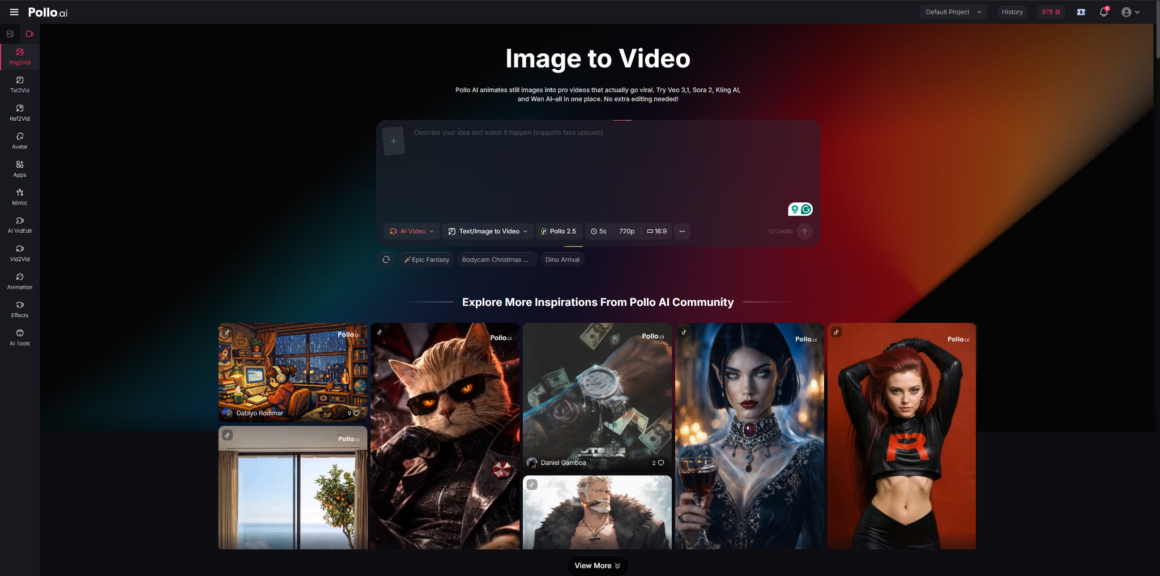
I’ve genuinely made Pollo.ai my go‑to because it combines multiple top AI models — Veo, Sora, Runway, Kling, Pika — in a single platform I can access from web, Android, or iOS. I upload a static image, add a prompt, and in minutes Pollo generates motion, integrated sound, and effects that feel surprisingly cinematic. It stood out most for versatility and speed among all free tools I tested.
Pros:
- Combines multiple best ai video generator models under one roof for flexible outputs
- Very fast — generates videos in minutes
- Works well on web, Android, and iOS
- Offers both cinematic and social‑style outputs
- Easy to use even for beginners
Cons:
- Output quality varies with model choice
- Some styles feel less polished than premium tools
Best for: Creators who want one platform that does it all — quickly and for free.
2. Runway — Best for Creative Control (Free Tier Available)
Runway has long been a favorite among creative professionals, and its free tier still delivers solid image‑to‑video results. As I worked with it, I liked how much creative control you can exercise: tweaking motion, camera angles, and styles before you generate helps create more intentional visuals. However, the free plan has limited credits and can feel overwhelming at first if you’re new to these tools.
Pros:
- Robust feature set with camera control and model variety
- Good for intermediate users who want more control
- Includes multiple video gen models
Cons:
- Free tier often has tight limits on usage
- Interface has a learning curve
Best for: Intermediate creators or designers who want more control than typical “auto” tools.
3. OpenAI Sora — Best for Narrative‑Style Videos
OpenAI’s Sora impressed me with its ability to generate more narrative‑feeling clips. While the free experience limits resolution and length on many accounts, even short outputs have coherent motion and storyline direction. You’ll get the best results with clever prompts and a bit of patience. The downside: free tiers often restrict you to very short clips.
Pros:
- Strong narrative consistency
- Easy prompt‑based workflow
- Great for storytelling or explanatory clips
Cons:
- Free tier resolution and length are limited
- Not always ideal for complex motion scenes
Best for: Creators focused on narrative or story‑driven videos from a single image.
4. CapCut — Best for Social Edits + Quick Exports
CapCut isn’t just a video editor — its AI features can animate static images and add transitions, effects, and music. In my tests, it was less cinematic than others, but extremely useful for fast reel creation. The biggest advantage is how deeply integrated CapCut is with social media workflows.
Pros:
- Great social media‑friendly features
- Built‑in editing + effects
- Very easy to use
Cons:
- Limited cinematic motion and realism
- Free tier can add watermarks
Best for: Social creators and marketers who want quick, platform‑ready clips.
5. Canva AI — Best for Beginners & Simplicity
Canva now includes image‑to‑video AI generation that’s extremely easy to use. I appreciated how simple it was to go from an image to a moving clip — but Canva’s free results are more limited in motion fidelity than others. It’s perfect if you want something quick without learning new tools.
Pros:
- Very beginner‑friendly
- Broad design ecosystem
- One‑click results
Cons:
- Motion quality is more basic
- Free videos are short and simplified
Best for: Casual creators who want fast video enhancements without complexity.
Comparison Table: Best AI Image to Video Generator Free Tools
| Tool | Free Tier Available | Motion Quality | Ease of Use | Best For |
| Pollo.ai | ✔️ | ⭐⭐⭐⭐ | ⭐⭐⭐⭐ | All‑in‑one creators |
| Runway | ✔️ | ⭐⭐⭐⭐ | ⭐⭐⭐ | Creative pros |
| OpenAI Sora | ✔️ | ⭐⭐⭐⭐ | ⭐⭐⭐ | Narrative makers |
| CapCut | ✔️ | ⭐⭐⭐ | ⭐⭐⭐⭐ | Social videos |
| Canva AI | ✔️ | ⭐⭐ | ⭐⭐⭐⭐ | Beginner simplicity |
If you’re specifically hunting for a free ai image to video generator that genuinely works in 2026, Pollo.ai stands out: it’s fast, flexible, powerful, and truly built for creators who want one tool to handle most needs — without switching platforms.
Part 2. Why I Choose Pollo.ai?
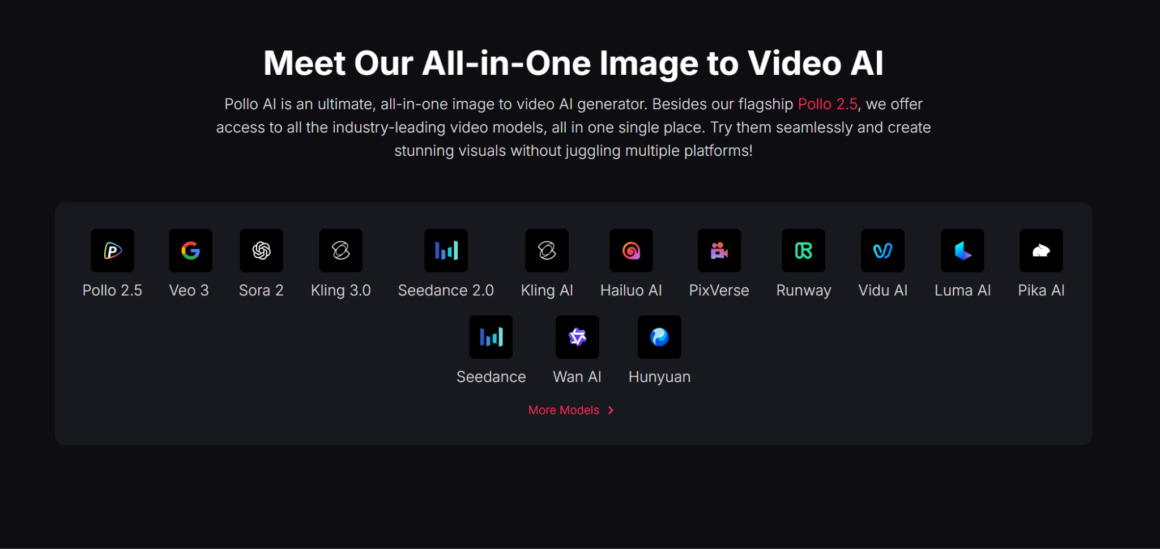
After testing all of the above extensively, here’s why Pollo AI became my primary choice:
- Multi‑Model Flexibility:
It integrates some of the best ai video generator models — including Veo, Sora, Runway, Kling, and Pika — so I can switch styles and motion approaches depending on the project without leaving the tool. This means I don’t need five separate subscriptions to experiment with cinematic versus social‑style videos. - Fast Generation at No Cost:
On the free tier, Pollo.ai delivered motion videos — with sound and effects — in minutes. I didn’t have to juggle confusing credits or unexpected paywalls before I even tested results. - Cross‑Platform Convenience:
Whether I’m on a desktop web browser, Android device, or iPhone, Pollo.ai offers a consistent experience. Being able to work on mobile without losing any key features is a huge productivity boost. - Versatility for Every Creator:
From quick social animations to cinematic clips with sound and transitions, Pollo adapts to my creative needs — something I didn’t get with most single‑model tools. - Beginner‑Friendly Yet Powerful:
New users can jump in quickly, but there’s enough depth — choice of models and motion styles — that advanced creators won’t feel boxed in.
In short, Pollo.ai strikes a rare balance between power, ease of use, and cost (especially on the free tier), making it my top pick for nearly every project.
Part 3. FAQs
Q: What exactly is an AI image to video generator?
A: It’s an AI tool that takes a static image (and often a text prompt) and creates a video by adding simulated motion, transitions, and visual effects — essentially turning a photo into a dynamic clip. These systems use advanced generative models trained on large video and image datasets.
Q: Are free AI image to video generator tools actually usable?
A: Yes — many tools offer free tiers that let you generate short clips. Quality varies by tool, and some limit resolution or video length, but you can still produce usable videos without paying upfront.
Q: Which free tool gives the highest quality output?
A: Among those with genuinely free options, tools that leverage strong models like OpenAI’s Sora or Google Veo typically produce better fidelity — but they often cap length or impose limits. Pollo.ai balances quality and accessibility well.
Q: Do these tools allow commercial use on free tiers?
A: It depends on the tool’s terms. Some free tiers permit commercial use, while others restrict output to personal use or add watermarks. Always check each platform’s licensing terms before publishing commercially.
Q: Can I create long videos with a free AI video generator?
A: Most free tiers limit video length. Typically, you’ll get short clips (5–15 seconds) on the no‑cost plan, with longer outputs unlocked on paid plans or higher tiers.
Conclusion
The landscape of free ai image to video generator tools in 2026 is stronger than ever. Whether you’re a beginner making social clips, a marketer trying to capture attention, or a creator experimenting with cinematic motion, there’s something for you.
While every tool here has its merits, Pollo.ai stands out as the most balanced and versatile — combining multiple top models, quick generation times, cross‑device support, and a genuinely usable free experience.
If you’re serious about AI‑powered video creation in 2026, give Pollo.ai a try first — it might be the only tool you need to start creating dynamic videos from images today.
References
- Best Image to Video AI Tools in 2026 (tested & ranked) – Vivideo.ai review of tools & ratings.
- Multiple free image‑to‑video AI tools available online (Flux AI model aggregator).
- AI image‑to‑video tools like VidMix offer easy online conversion.